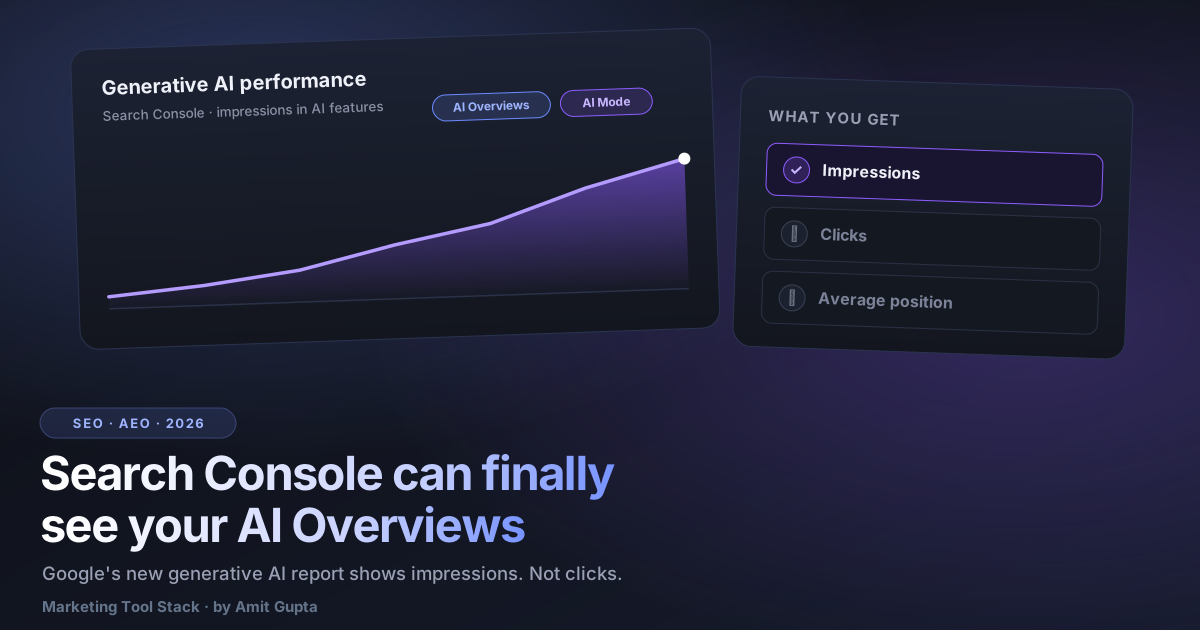

On June 3, 2026 Google added Search Generative AI performance reports to Search Console, the first dedicated view of your impressions inside AI Overviews and AI Mode. Here is the catch that matters more than the launch: it shows impressions only. No clicks, no average position. You can finally see if the AI showed your page. You still cannot see whether it sent you anyone.
I have been waiting two years for Google to report gen-AI presence at all, so the launch is real progress. It is also half a report. Before you rebuild a dashboard around it, understand exactly what it measures and what it withholds, because the gap between those two things is where every bad decision this quarter is going to come from.
What the report actually shows
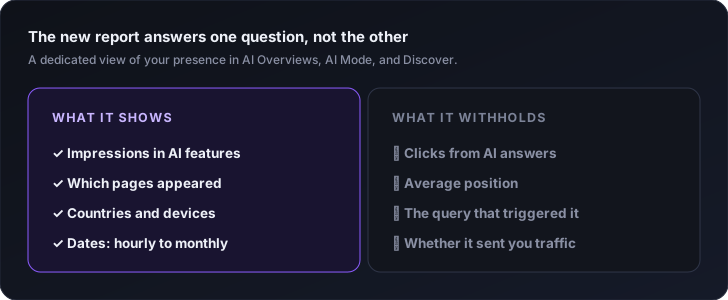
The Search Generative AI performance report isolates your gen-AI appearances from your regular blue-link data for the first time. Per Google's Search Central blog, it covers impressions inside AI Overviews and AI Mode on Search, plus generative AI in Discover. Until now those impressions were folded into your normal Performance report with no way to pull them apart. Now they sit in their own view.
The breakdowns are the standard Search Console set: impressions by page, by country, by device, and by date, with the date grain going from hourly all the way up to monthly. So you can watch how often the AI features surfaced a given URL, in which markets, and how that moved over time. That is real new signal. For the first time you can answer "does Google's AI show this page" with data instead of by manually typing prompts and screenshotting the result.
One important limit on availability. Google announced the report on June 3 and expanded access around June 23, but it is rolling out to a subset of sites, not everyone at once. Search Engine Land reported the UK went first, with a global expansion planned and no firm date attached. So if you open Search Console today and the report is not there, you are not doing anything wrong. You are just not in the rollout yet.
How to actually use it this week
Start by checking whether you even have the report. Open Search Console, look for the generative AI performance view, and if it is missing, note the date and move on. There is nothing to configure and no beta to join, since access is being granted server-side in waves.
If you do have it, baseline your gen-AI impressions now. Export the current numbers by page and by market before you change anything, so you have a "before" to compare against later. A trend only means something if you wrote down where it started.
Then run the comparison that actually teaches you something. Put the pages the AI surfaces next to the pages your classic blue-link report favors. They will not fully match. Some URLs the AI leans on are not your top organic performers, and some of your ranking workhorses barely show up in AI features. That mismatch is your worklist. It tells you which pages the model already trusts as source material, and which of your strong pages the answer layer is ignoring.
Watch the trend by date rather than staring at one snapshot. Gen-AI surfaces are volatile, so a single day tells you almost nothing. The weekly and monthly views are where a real direction shows up. When you want to improve the pages the AI is ignoring, the job is to make each section answer one question cleanly, and you can pressure-test that with the free SEO + AEO Content Rater, which scores direct-answer sentences and question headings as a separate grade from classic SEO. Labeling your entities cleanly helps too, and the FAQ Schema Generator builds valid markup in about a minute. Treat schema as hygiene, not a growth lever.
One warning. Search Engine Land reported that Google is also testing a control in Search Console to opt out of appearing in, or grounding, generative AI responses. Do not flip that off by reflex. Opting out does not win back the clicks the AI answer absorbed. It just removes you from the surface where a growing share of your buyers now read about your category. Decide that one deliberately, with data, not as a protest.
The catch: appearance, not traffic
The report answers "does the AI show my page" and stops there. It does not answer "did it send me anyone." Impressions only, no clicks, no position. You can confirm you were cited. You cannot measure whether the citation moved a single person to your site.
Google is candid that this is a starting point. A Google spokesperson said, quote, "We're continuing to work with website owners to understand what insights will be most helpful to inform their strategies, and we'll introduce additional metrics over time." Read that plainly: clicks and position are not in the report yet, and there is no commitment on when they arrive. Build around what exists, not around what was implied.
This gap is not academic. AI Overviews depress organic clicks, so a page can be showing up constantly in AI features while its actual visits fall. Impressions up, traffic flat or down, is a completely plausible reading of this report. If your analytics already undercount AI-driven sessions, and most stacks do, you now have a presence metric on one side and a traffic blind spot on the other. I wrote about that measurement gap and how AI traffic slips through standard dashboards in this piece on why your traffic dashboard undercounts AI.
Is SEO dying? The click is. The job isn't.
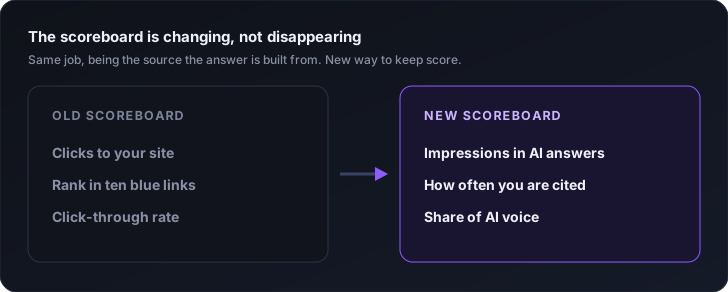
The ten-blue-links click is dying. The job is not. Zero-click AI answers are draining the traffic that used to follow a good ranking, so if your definition of SEO is "earn a position, collect the click," that model is clearly eroding. But being the source an answer is built from is the same work you have always done, pointed at a new surface. Do not let anyone sell you "SEO is dead" as a headline. It is a channel shift, not a funeral.
I say this bluntly because the panic is bad for decisions. The discipline underneath SEO, earn trust, publish the clearest answer, get named on pages the system already believes, has not changed. What changed is the scoreboard. The old one counted clicks. The new one counts appearance, citations, and share of AI voice: how often you are the page the answer quotes. This is not a rebrand of SEO into AEO. It is one job across two surfaces, which I argued in the SEO vs AEO piece.
And the surface matters more every quarter. Among the people who have adopted AI search, a real share now start there instead of at Google's blue links, a shift I broke down in this look at AI search overtaking Google for adopters. If that is where attention is moving, presence there is not optional, and measuring it becomes the job. The metric to actually run is share of AI voice, not a single rank check.
What to do
Use the new report for what it is good at and do not ask it for what it withholds. Check whether you have it. Baseline your gen-AI impressions. Compare the pages the AI surfaces against the pages your blue-link report favors, and fix the gap. Watch the trend by date, not the daily noise. Leave the opt-out toggle alone unless you have a real reason. And keep measuring share of AI voice yourself, because Google is giving you appearance data while still holding back the clicks that would tell you what it is worth.
The honest position is that we now have half the picture we asked for, and half is more than zero. A page that never appears in an AI answer cannot earn anything from one, so seeing appearance at all lets you find and fix the pages the model ignores. Just do not confuse being seen with being visited, because for now Google is only showing you the first one.
So here is the question I would put on the table before your next reporting cycle: if your gen-AI impressions doubled next month and your sessions did not move, would your current dashboard tell you that, or would it just show you a number going up?
, Amit