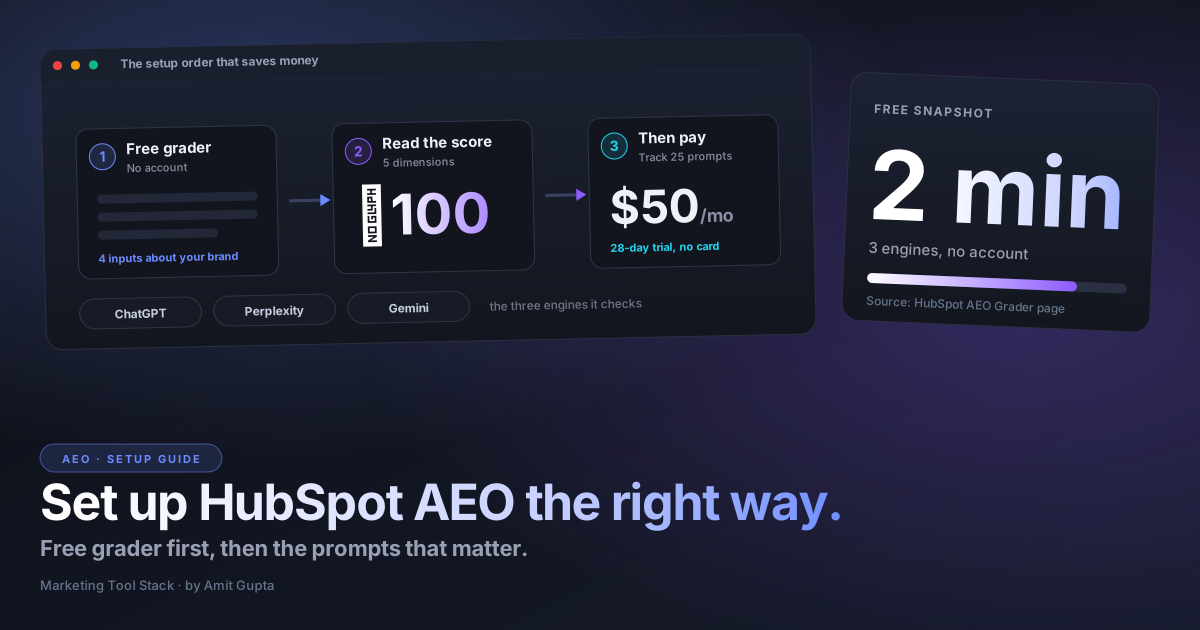

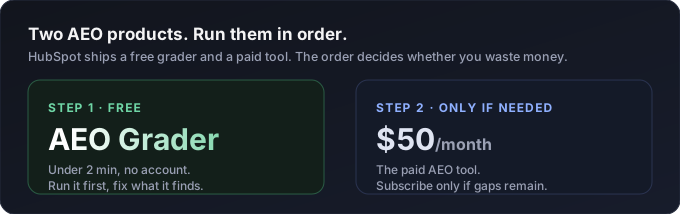
HubSpot ships two different AEO things, and the order you set them up in decides whether you waste money. There's a free AEO Grader that scores you in under two minutes with no account, and a paid AEO tool that runs 50 dollars a month. Run the free one first. Fix what it finds. Only then decide if the subscription is worth it.
I set this up the way a first-timer would, from HubSpot's own product pages, and wrote down what actually matters versus what the marketing copy glosses over. If you're opening HubSpot AEO for the first time, this is the path I'd follow, and the two or three places I'd slow down.
What is HubSpot's AEO tool, and why are there two of them?
HubSpot has two separate products with almost the same name. The AEO Grader is a free, one-time diagnostic. The HubSpot AEO tool is a paid, ongoing tracker. People conflate them, then either pay too early or expect the free check to keep monitoring. It won't. The grader is a snapshot. The tool is the camera that keeps rolling.
Both answer the same question: when someone asks ChatGPT, Perplexity, or Gemini about your category, does your brand show up, and how does it get described? That's answer engine optimization. HubSpot launched the tracking tool at its Spring 2026 Spotlight in April, built on its Breeze AI layer, and it's still labeled beta in the knowledge base. Worth remembering when a number looks off.
Start free: how to run the AEO Grader in your first two minutes
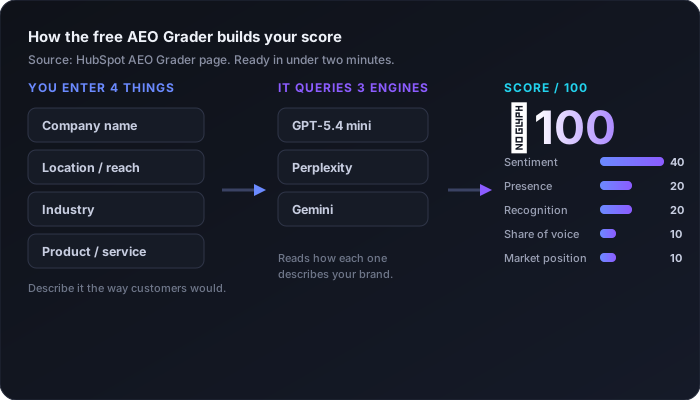
Go to the AEO Grader page. It asks for four things, and nothing else: your company name, a location that describes the reach of your business, your industry, and your product or service. HubSpot's one instruction that matters here is to describe the product the way your customers would, not the way your pitch deck does. If buyers call it "email software" and you type "omnichannel lifecycle orchestration," you're testing a phrase nobody asks an AI.
Submit it and the grader sends your brand to three engines: GPT-5.4 mini from OpenAI, Perplexity, and Google's Gemini. It reads how each one talks about you, scores the results, and hands back a composite number out of 100 with a written interpretation. HubSpot says the snapshot is ready in under two minutes. There's a short form to see the full breakdown, so expect to trade an email for the detail.
How do you read the grader score without over-reacting?
The score out of 100 is built from five weighted dimensions, and the weights tell you what HubSpot thinks matters. Sentiment Results carries 40 of the 100 points: the positive, negative, or neutral tone of how AI describes you. Presence Quality is 20 points, roughly how much the models actually know about you. Brand Recognition is another 20, how widely you're recognized across AI training data. Share of Voice is 10 points, where you rank against competitors. Market Competition is the last 10, which slots you as Leader, Challenger, or Niche Player.
Here's the part a first-timer needs to hear. This is one reading, on one day, from one set of prompts the grader chose for you. AI answers vary run to run. A University of St. Gallen paper this year made the technical case that you should treat AI visibility as a distribution, not a single number, because the same question returns different answers across runs and time. So read your grader score as a rough altitude, not a rank you own. The value is in the breakdown, which tells you whether the problem is tone, awareness, or just losing to a competitor.
When should you actually turn on the paid AEO tool?
Turn it on when the grader shows a real gap and you want to watch whether your fixes move it. Not before. The paid HubSpot AEO tool is 50 dollars a month, or 45 if you pay annually, and it comes with a 28-day free trial that doesn't ask for a card. It's also bundled into Marketing Hub Professional and Enterprise, so check whether you already own it before you add a line item. One useful detail: it works with a site hosted anywhere, so you don't need to be on HubSpot's CMS to use it.
The base plan tracks 25 prompts. That number is the entire game, so I'd spend real time on it. A prompt is a question you want to watch across the engines, like "best marketing automation for a small B2B team" or "HubSpot versus Marketo for lifecycle." The tool will suggest prompts from what it knows about your company, your competitors, and your industry, and if you're on the CRM it pulls from what's stored about your buyers. Suggestions are a starting point, not the answer. Curate them.
The mistake I'd warn a first-timer off is spending all 25 slots on branded, top-of-category questions you already win. Spread them. Use a few branded prompts, several category and comparison prompts where the buyer hasn't decided yet, and a couple of problem-first prompts phrased the way someone would actually type them at 11pm. Add your real competitors so Share of Voice means something. Bottom-funnel comparison prompts are where AI answers move deals, so weight the list toward those.
Reading the dashboard: visibility, share of voice, sentiment, citations
Once it's running, the tool checks your prompts against the engines on a schedule and rolls the results into a few panels. A brand visibility score shows how often you get mentioned. A share of voice metric compares that presence to competitors. Sentiment runs on a scale from minus 100 to plus 100, so you can see not just whether you're named but whether the mention helps you.
The panel most people skip is citation analysis, and it's the one I'd open first. It shows which domains, pages, and content types the engines pull from when they answer your prompts, and it splits them into your own content, competitor domains, and third-party sources like social or review sites. That's a to-do list in disguise. If a competitor's comparison page keeps getting cited on a prompt you care about, you know exactly what to publish next.
The payoff: turning recommendations into a post
The reason to stay in HubSpot rather than stitch together three point tools is the last step. The AEO tool produces prioritized recommendations, create a page, update an existing one, publish a social post, and on Marketing Hub Pro or Enterprise those connect to the content tools. Open the Recommendations tab, pick a recommendation set to the blog channel, click through the overview, and Breeze drafts a post in your account's brand voice that opens in the HubSpot blog editor.
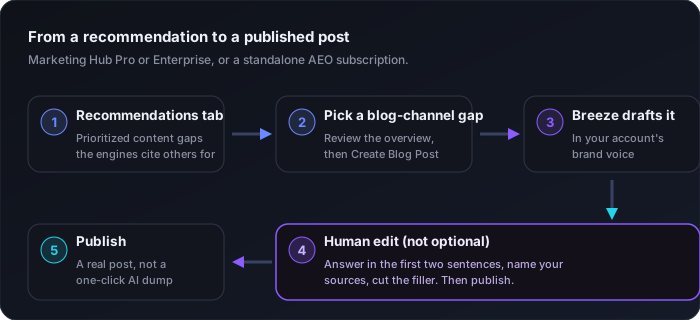
One warning, because this is where teams get lazy. A Breeze draft is a draft. It opens in the editor for human refinement for a reason. If you one-click publish AI content aimed at AI engines, you get the bland, sourceless prose the engines are learning to ignore. Treat the draft as a fast first pass, then do the thing that actually earns a citation: put the direct answer in the first two sentences, name your sources, and cut the filler.
The first-timer mistakes, in one place
Paying before running the free grader. Filling all 25 prompt slots with branded questions you already win. Reading a single score as truth when AI answers swing run to run. Ignoring the citation panel, which is the only one that tells you what to build. And auto-publishing Breeze drafts without an editor's pass. Avoid those five and you're ahead of most teams setting this up right now.
Where a free tool of mine fits
HubSpot's tool measures presence: how often the engines name you. It doesn't grade whether a given page is structured to get pulled into an answer in the first place. That's a different job. Before you publish anything that came out of a recommendation, run it through my free SEO + AEO Content Rater. It scores direct-answer sentences, real question headings, and paragraph length as a separate sub-grade from classic SEO, which is exactly the structure an answer engine rewards. It's free and it never sends your draft anywhere. If you want the measurement side without a subscription, I wrote a whole piece on running your own share of AI voice check across the engines.
The honest caveats before you commit
Three things to hold in mind. The tool is beta and still rolling out, so behavior and panels will shift. The engines are versioned, GPT-5.4 mini today, something else next quarter, and your scores move with them, not just with your work. And the scoring is HubSpot's own model reading AI output, so treat any single number as directional. At 50 dollars a month it's cheap enough to trial and honest enough to be useful, as long as you don't mistake a snapshot for a scoreboard.
The real question isn't whether to buy HubSpot AEO. It's whether you've read your own top page the way ChatGPT does, from the first visible sentence down, before you pay anything to watch how it gets described. Have you?
Amit