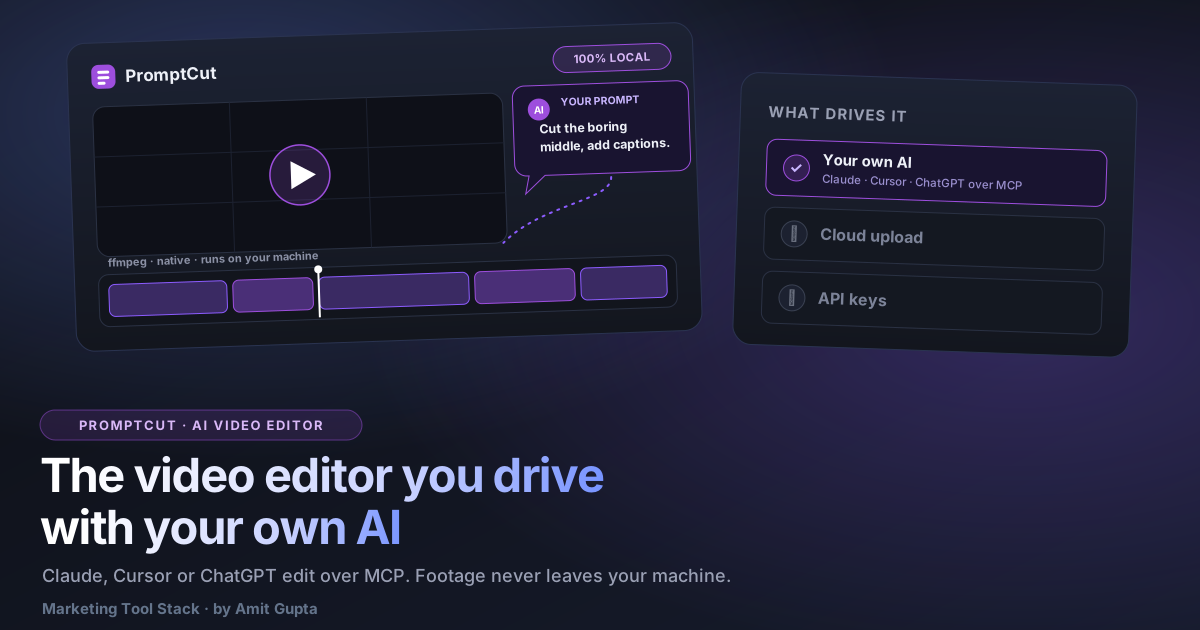

MCP stopped being an Anthropic-only trick faster than almost anyone expected. Per OpenAI's own announcement in March 2025, it added support for the Model Context Protocol across ChatGPT's desktop app, its Agents SDK, and the Responses API. Per Google's own announcement in April 2025, Gemini added MCP support too. So "connect your AI to a video editor" is not a Claude party trick. As of August 2026 it works with the AI apps most of you already have open.
This post answers the 14 questions a skeptical evaluator actually asks about an AI video editor, and it uses PromptCut as the honest answer to each, including the two or three places where the honest answer is "no, not yet." PromptCut is a local desktop app that you drive from your own AI over MCP. No cloud upload, no built-in model you cannot swap, no watermark on the free tier.
What does "AI video editor" actually mean?
The phrase now splits into two categories that barely resemble each other. Category one is cloud SaaS with a built-in model: you upload your footage to their servers, their own AI does the work, and the free tier is watermarked or credit-metered. Category two is bring-your-own-AI over MCP: the editor runs on your own machine, and you point your existing AI host at it. PromptCut is the second kind. Descript, CapCut, Invideo, and Captions are the first.
The split matters because it decides three things before you touch a single feature: where your footage lives, whose model you are stuck with, and what the free tier costs you in watermarks or credits. Category one answers those with "our servers, our model, our meter." Category two answers with "your disk, your AI, your terms." Everything below is really just that one distinction, applied to the questions people actually type into a search box.
Can AI actually edit my video from a text prompt?
Yes. You type a plain-English prompt, your AI reads it, plans a sequence of edit steps, and PromptCut executes each one with real ffmpeg on your machine. The mechanism is MCP tool calls: your AI never touches the video directly, it calls named tools that PromptCut exposes, and PromptCut runs the actual encode.
That separation is the whole design. The language model is good at planning and terrible at pushing pixels, so it does the planning and hands the pixel work to ffmpeg. You get natural language on the front and a real, deterministic encoder on the back, with nothing invented in between.
Which AI can edit video, can I use Claude, ChatGPT, or Cursor?
Any MCP-capable host. As of August 2026 that includes Claude Code, Claude Desktop, and Cursor, the three PromptCut documents directly. Because OpenAI added MCP to ChatGPT in March 2025 and Google added it to Gemini in April 2025, the list of hosts that speak the protocol keeps growing, so this is not locked to one vendor.
I keep that date stamp deliberate. Host support moves, so treat "as of August 2026" as a snapshot, not a permanent promise. The point stands regardless of the exact roster: PromptCut speaks a shared protocol, so it inherits whatever hosts adopt it rather than betting on one company.
If you want to try the premise with zero install first, the site's own browser-based Video Editor at /video is the no-install version of this same idea: a timeline, trim, split, text, music, and MP4 export, running entirely client-side in your browser. PromptCut is that premise taken to a desktop app, with your own AI driving it instead of your mouse.
How do you connect your AI to a video editor?
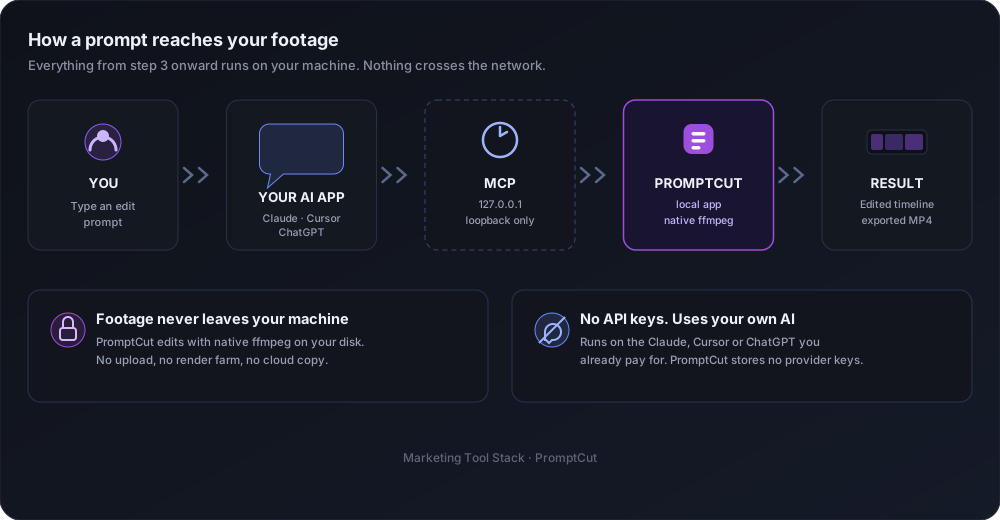
You add PromptCut as an MCP server in your AI host, then talk to it. PromptCut runs a local server on 127.0.0.1 and hands you a persistent pairing token that stays stable across restarts, so you pair once and forget it. It works with any MCP host, and there are three documented paths.
The loopback address is doing quiet but important work here. Because the server lives on 127.0.0.1, it is reachable from your own machine and nowhere else, so there is no public endpoint for anyone to find. The pairing token is the only stored secret, and it stays stable across restarts so you are not re-authorizing the connection every morning.
For Claude Code, it is a single terminal command:
claude mcp add --transport http promptcut "<url>". That registers the local server
and you are done.
For Claude Desktop, you bridge the connection in claude_desktop_config.json using
npx -y mcp-remote "<url>", which relays the desktop app to PromptCut's HTTP server.
For Cursor, you add an entry with the server url to ~/.cursor/mcp.json. Same idea, same
local server, different config file. Any other MCP host follows the same shape: point it at the
loopback url, pair with the token, start prompting.
Is it actually private, or does it upload your footage?
Does it upload my footage, is it local, private, and offline?
No, PromptCut does not upload your footage. The video files never leave your machine. The only thing that goes to your AI host is your text prompt and PromptCut's text responses, never the footage itself. Editing runs locally through native ffmpeg, so the pixels stay on your disk from import to export.
This question is not paranoia. In June 2024, as widely reported by The Verge and PetaPixel, an Adobe Terms of Use update triggered a backlash when users feared Adobe could access or train on files stored in its cloud. Whether or not that fear was fair, it was real, and it is exactly the risk a local editor removes. There is no cloud copy to access, because there is no cloud copy.
Is it free, and is there a watermark, account, or API key?
Free. PromptCut has no watermark, no account, and no API key stored in the app. Inference runs on your own AI subscription through your own host, so PromptCut never bills you for tokens and never holds a provider key. You bring the AI you already pay for.
I want to be precise about what "free" covers, because that is where a lot of tools get slippery. The editor itself is free. The intelligence driving it is whatever plan you already have with Anthropic, OpenAI, Google, or another provider. PromptCut does not resell you tokens with a markup, and it does not gate export behind a paywall.
What can you actually tell it to do?
More than the marketing shorthand suggests, and with a few honest gaps. Here are the jobs people ask about most, with the actual tool behind each one so you can see where the line sits.
Can it auto-caption my video?
Yes, and fully offline. PromptCut bundles whisper.cpp, a local speech-to-text engine, so captions are generated on your machine without sending audio to any server. This matters because a chat model over MCP cannot transcribe audio itself, so transcription has to happen locally, and whisper.cpp is what does it.
That last point is the honest engineering reason, not a privacy slogan. Text is the only thing an MCP tool call can carry back and forth, so audio has to be turned into text somewhere on your side before the AI can reason about it. Bundling whisper.cpp is how PromptCut keeps captions working without asking you to sign up for a separate transcription service or ship your audio off the machine.
Can it resize video for Reels, TikTok, and Shorts?
Yes. PromptCut exposes a set_aspect tool that handles 16:9, 9:16, 1:1, and 4:5, padding or cropping to fit. So a prompt like "make this a 9:16 Reel, auto-caption it, and duck the music under my voice" becomes three tool calls: set_aspect, the whisper.cpp caption pass, and music ducking. One sentence in, three real operations out.
Can it trim, split, reorder, add music, and add transitions?
Yes, all of it. The named tools are trim_clip, split_clip, reorder_clip, set_transition, set_music, and set_music_ducking. One honest detail worth calling out: set_transition is a real ffmpeg xfade crossfade, an actual dissolve between clips, not a cheap dip-to-black faked in software. Your AI chains these calls in the order your prompt implies.
Can it cut the silences and filler words for me?
Yes, and this is the part that used to be locked behind a paid editor. remove_silences finds the dead air in your speech and cuts it out, closing the gaps. remove_fillers runs a word-level transcript and drops the um and the uh. The same transcript drives generate_word_captions, the word-by-word animated captions people expect on a Reel. On top of that it grades color (set_clip_color, set_look), does a Ken Burns zoom (set_clip_zoom), and drops a second video in the corner for picture-in-picture (add_video_overlay). All of it runs on your machine, from your prompt, and every step is undoable.
Can it add images, logos, and overlays?
Partly. PromptCut can always place existing files with add_image and add_image_clip, so logos, lower-thirds, and overlay clips work out of the box. But generating a new image needs a separately connected image-generation MCP server, which PromptCut does not bundle. Wire one up and "generate a sunset image and add it as a 5-second overlay" works end to end. Skip that step and the generate half simply is not there.
Do you need to know how to edit?
Do you need editing skills to use it?
No timeline-dragging skill, but yes editorial judgment. You are directing the edit, not cutting it, so you do not need to know a keyframe from a keyboard shortcut. You do need to know what a good cut looks like, because PromptCut executes your intent faithfully, and a vague intent produces a vague edit.
That is the honest tradeoff. The mechanical skill barrier drops to near zero. The taste barrier does not move at all. If you cannot describe the video you want, no amount of prompting fills that in for you.
What format does it export?
MP4, H.264 video with AAC audio. That is the default, and it plays everywhere: phones, browsers, social platforms, and every editor you might hand the file to next. Because the encode runs on native ffmpeg locally, export speed depends on your machine, not on a server queue.
Does it work on Windows and Mac?
Yes, both. PromptCut is an Electron app, so it runs on Windows and macOS from the same codebase. It is desktop only, though. There is no mobile version, because the whole design depends on native ffmpeg and local files, which a phone sandbox does not give you.
What can go wrong, and what won't it do?
Plenty, and I would rather you hear it from me than from a support forum. PromptCut has no built-in model, so with no MCP host connected it does nothing at all: it is a body waiting for a brain. It is desktop only, with no mobile version.
Today it runs from source. You clone the public repo, run npm install, then npm start. Packaged one-click installers are on the roadmap, not shipped, and I am not going to pretend otherwise. Destructive edits require a human confirm and are undoable, which is a safety feature, but it also means PromptCut is not fully hands-off: you stay in the loop on anything that overwrites. A plain sequential prompt like "Import launch.mov, trim to the first 20 seconds, add the title 'Launch Day' for 3 seconds, and export to my Desktop" works cleanly. A vague or self-contradicting prompt produces exactly the muddled edit you described. The tool is honest, not magic.
How is this different from Descript, CapCut, Invideo, or Captions?
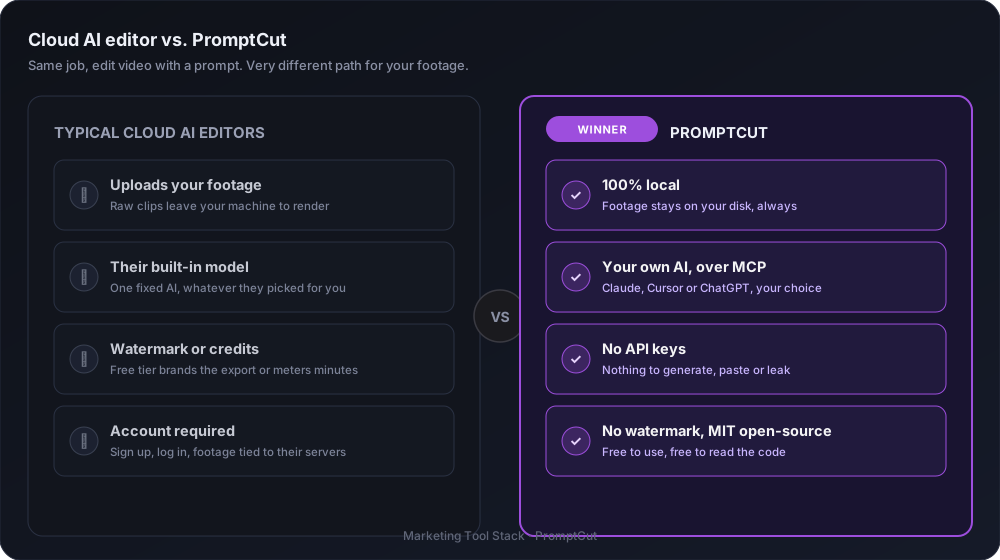
All four are cloud SaaS. Each uploads your media to its own servers and runs a proprietary model you cannot swap, and each watermarks or credit-meters its free tier. PromptCut inverts all three: it runs local, it brings your own AI over MCP, and it edits with native on-device ffmpeg.
Line by line: Descript uploads your media and runs its own locked model. Its signature trick, cutting silences and filler words from a transcript, is exactly what PromptCut does with remove_silences and remove_fillers, except the transcript is made on your machine by whisper.cpp and never leaves it. CapCut is the same cloud pattern, watermark and credit meter included on the free path. Invideo is cloud generation on metered credits. Captions is a cloud app with its own model you do not get to change. None of that makes them bad products. It makes them a different bargain, one where your footage lives on someone else's server and the intelligence is theirs, not yours. PromptCut takes the opposite bet on all three counts.
So here is the honest frame before you pick one. If your footage is casual and you never think about where it lives, a cloud editor is genuinely fine, and I am not going to talk you out of one. But if your video is client work, unreleased product, or anything you would not email to a stranger, the question stops being about features and starts being about custody.
Before you upload your next raw cut to someone else's server, ask yourself one thing: if that platform changed its terms next June, the way Adobe's change landed in 2024, would you be comfortable with where your footage already sits?
, Amit