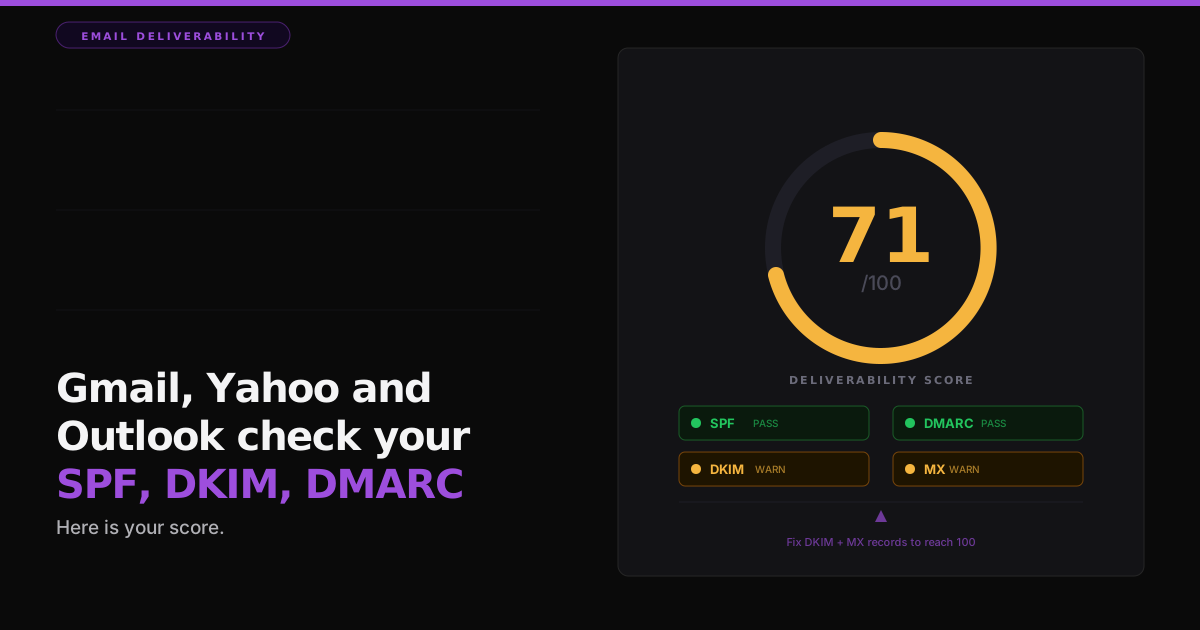

Run google.com through an email authentication check and it scores 71 out of 100, not 100. That is not a broken domain. It is one of the most competent mail setups on the internet, and it still leaves points on the table.
I built a free Email Deliverability Checker that reads a domain's SPF, DKIM, DMARC and MX records over public DNS and returns a 0 to 100 score. It does not stop at a grade. It hands back an ordered list of what to fix and how many points each fix adds. When I run the big providers through it, almost none of them hit 100. The gap is never exotic. It is the same three or four records, set up years ago and never revisited.
The four records mailbox providers actually check
SPF is the list of servers allowed to send mail as your domain. Ending the
record in ~all (soft fail) is good. Ending in -all (hard fail) is
best, because it tells receivers to reject anything from a server not on the list. Ending in
+all is a disaster: it lets anyone on the internet send as you. One more trap:
SPF is capped at 10 DNS lookups, and a record that chains past that limit fails quietly.
DKIM is a cryptographic signature that proves the message was not altered between your server and the inbox. If it is missing on the standard selectors, or the key is only 1024-bit, or the published key is empty because it was revoked, you lose points. In most scores this is the single biggest swing, because a missing DKIM key is common and expensive.
DMARC tells receivers what to do with mail that fails SPF or DKIM, and where
to send the reports. A policy of p=none is monitor-only: it watches spoofing
happen and does nothing about it. p=quarantine sends the fakes to spam.
p=reject blocks them outright. Add a rua= address so the daily
reports land somewhere a human reads them.
MX is whether your domain can receive mail at all. One MX host means no backup: if that server is down, mail bounces instead of queuing. A Null MX is a deliberate signal that the domain does not accept mail, which is correct for a send-only domain and wrong for a live mailbox.
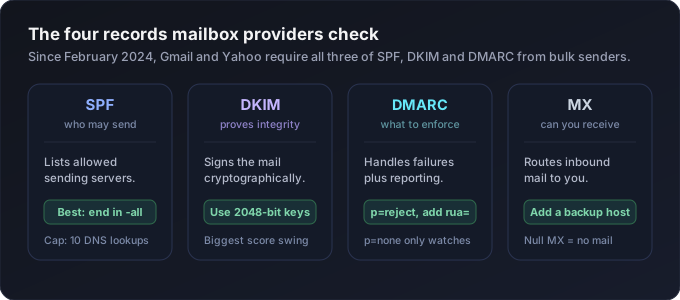
There is one more line that matters more than any single record. In February 2024, Gmail and Yahoo started requiring bulk senders to have all three of SPF, DKIM and DMARC. Two of three is no longer a passing grade at the two largest inboxes in the world. Having only two leaves both points and inbox placement on the table, which is exactly why google.com scores a 71 and not a 90-something.
A score is useless without an ordered plan
Most checkers grade you and stop. A red X next to DKIM does not tell you whether to fix DKIM first or the missing MX backup first. So the checker sorts every fix by the points it adds, biggest first, and the gains sum to the exact gap between your score and 100.
For google.com's 71, the plan reads: publish a DKIM key on a standard selector (+17),
complete the full SPF plus DKIM plus DMARC set (+7), add a backup MX host (+3), and tighten
SPF from ~all to -all (+2). Seventeen, seven, three, two. That sums
to the twenty-nine points between 71 and 100.
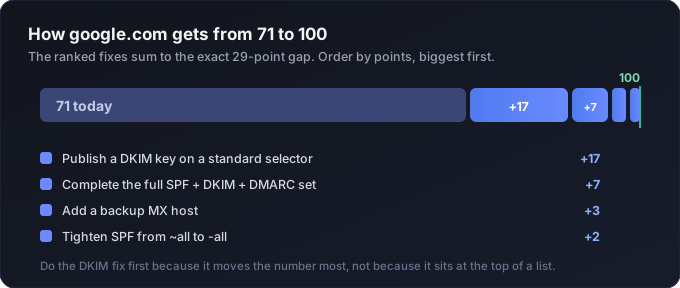
You do the DKIM item first because it moves the number most, not because it happens to sit at the top of an alphabetical list. That is the whole point of the ordering. The order is the advice. A grade tells you that you are short. A ranked fix list tells you what to touch on Monday and in what sequence.
How to run it on your own domain
Type your domain into the Email Deliverability Checker and give it a few seconds. It queries public DNS over HTTPS, so nothing about your mail content is sent anywhere. Only the domain name goes out, the same lookup any mail server does before it talks to you. Back comes the score gauge, a card per record with the raw value it found, and the ordered fix list.
Start at the top of that list and work down. Publish the DKIM key your email platform hands
you, confirm SPF and DMARC both exist, add a second MX host, then tighten the SPF qualifier
once you are sure every legitimate sender is accounted for. Do the SPF tightening last on
purpose: switching to -all with an incomplete sender list will bounce your own
mail, and that is a worse outcome than a soft fail.
One domain is never the whole story
Almost nobody sends from a single domain. There is the main site, a subdomain or two for marketing and transactional mail, whatever came with the last acquisition, a regional domain for one market, and the odd partner domain nobody remembers setting up. Every one of them has its own SPF, DKIM and DMARC, and any one of them can be the weak link a spoofer walks through. Checking them one at a time is the kind of chore that never actually happens.
So the checker has a bulk mode. Paste a list of domains, or drop a CSV or an Excel export straight from your CRM. It reads the domains out of any column, and if the file is a list of email addresses it reduces each one to its domain and drops the duplicates. Then it runs the same four checks on every domain and hands back a table sorted worst first: the score, a pass, warning or fail on each record, and the single highest-impact fix for that domain. Download the whole table as a CSV and give it to whoever owns your DNS.
The workflow is boring, and that is the point. Run your whole sending estate through it, sort by score, and fix the reds before the ambers. Anything under fifty is a domain that spoofers and spam filters find before your customers do. It handles up to two hundred domains a run, entirely in the browser, and the Excel reader only loads if you actually drop a spreadsheet, so a pasted list stays instant.
What this score is not
This grades DNS authentication, the layer mailbox providers check first. It is the foundation of deliverability. It is not a promise of inbox placement. A message can pass SPF, DKIM and DMARC cleanly and still land in spam because the copy trips a content filter, the sending IP has a poor reputation, or too many recipients hit delete without opening.
A true spam-content score, the kind a mail-tester style tool gives you, needs a real message sent to a probe inbox and scored on its actual contents. A browser tool cannot send that mail, so it cannot give you that number, and I would rather say so plainly than pretend a DNS check is the whole picture. Fix the authentication first, because a clean foundation is a precondition for everything else, then test real messages separately.
The reason so many domains sit in the low 70s is not incompetence. Email authentication is a set of records nobody revisits after the initial setup. A "good enough" configuration from three years ago is usually missing the DKIM key rotation, the reject policy, and the backup host that the 2024 sender rules now assume you have. Nothing dramatic broke. The bar moved, and the records stayed still. The score just makes that gap visible and countable, then tells you which point-value to chase first.
When did you last check what your own domain actually scores, and do you know which single fix would move it the most?
Amit